Why Schools Are Moving From Paper Records to Digital Systems
Discover why schools are replacing paper records with digital systems to improve student management, attendance, communication, examinations, reporting, data security, and daily administration.
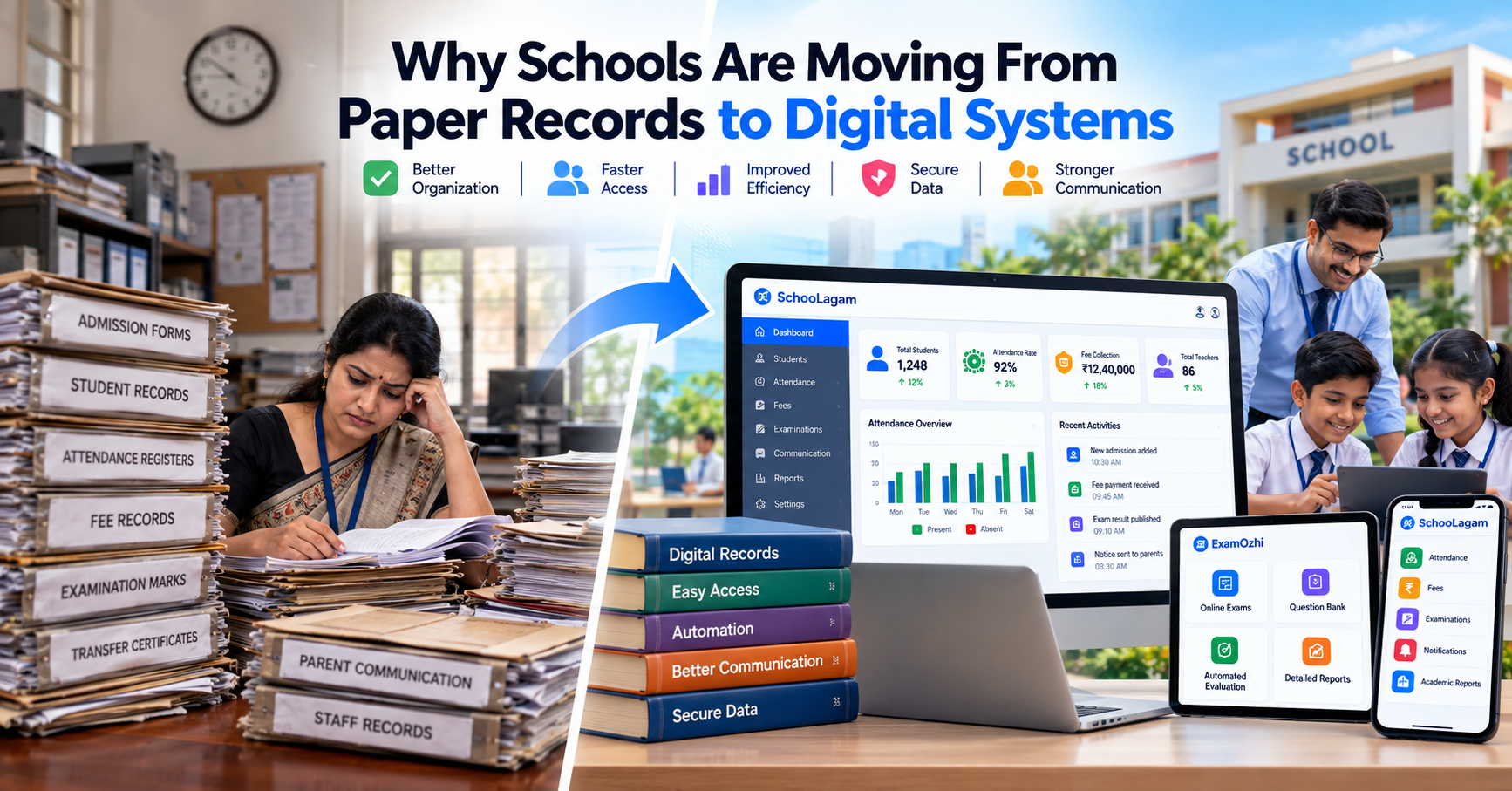
Schools generate and manage a large amount of information every day. Student records, attendance registers, fee details, examination results, parent communication, staff information, certificates, and administrative documents all need to be created, updated, stored, and retrieved.
For many years, much of this information was managed using paper registers, files, printed forms, and spreadsheets. While these methods can work for basic requirements, they can become difficult to manage as a school grows.
This is one reason more schools are considering the move from paper records to digital systems.
The shift is not simply about replacing paper with computers. It is about creating more organized ways to manage information, reduce repetitive administrative work, improve communication, support teachers, and make important records easier to access.
For school owners, principals, teachers, administrators, parents, and education professionals in India, understanding this transition can help schools make more practical technology decisions.
Why Schools Traditionally Used Paper Records
Paper records have been part of school administration for generations.
A school may maintain physical records for:
- Student admissions
- Attendance
- Fee payments
- Examination marks
- Transfer certificates
- Student documents
- Staff records
- Parent information
- Circulars and notices
- Academic records
- Administrative documents
Paper has some practical advantages. It is familiar, does not require specialized software, and can be used without an internet connection.
However, as the volume of information increases, maintaining large numbers of physical records can become increasingly difficult.
Finding an old document may require searching through files. Updating information may require rewriting records. Sharing information may require photocopies or manual communication.
These limitations have encouraged many organizations, including educational institutions, to explore digital alternatives.
The Limitations of Paper-Based School Records
Paper records are not automatically inefficient. The challenge usually appears when schools need to manage a large amount of information across different departments.
1. Difficult Information Retrieval
Finding a particular student's historical record may require searching through physical files.
If documents are stored across multiple rooms, cabinets, or departments, retrieval can take additional administrative effort.
2. Repeated Data Entry
The same student information may be written in several places.
For example, information collected during admission may later be entered into attendance records, examination records, fee records, and other documents.
Repeated data entry creates additional work and can introduce inconsistencies.
3. Physical Storage Requirements
Paper documents require physical storage space.
As the number of students and years of records increase, schools may need additional cabinets, rooms, or organized filing systems.
4. Difficult Record Updates
Updating paper records can be inconvenient.
A change in address, phone number, guardian information, or other student details may need to be reflected across several records.
5. Limited Accessibility
Physical records can normally be accessed only from the location where they are stored.
A digital system can provide authorized access from supported devices and locations, depending on the system design.
6. Risk of Physical Damage
Paper records can be affected by:
- Water
- Fire
- Dust
- Physical deterioration
- Misplacement
- Accidental damage
This makes proper backup and preservation important.
Paper Records vs Digital Systems
The difference becomes clearer when common school processes are compared.
| Area | Paper-Based Approach | Digital System |
|---|---|---|
| Student records | Physical files | Digital student profiles |
| Attendance | Registers | Digital attendance records |
| Fees | Receipts and registers | Digital fee tracking |
| Examination marks | Mark sheets/registers | Digital assessment records |
| Communication | Printed notices | Digital notifications |
| Reports | Manual preparation | System-generated reports |
| Data search | Physical file search | Digital search |
| Record updates | Manual changes | Digital updates |
| Storage | Cabinets and files | Digital storage |
| Information sharing | Copies/manual communication | Controlled digital access |
Digital systems do not eliminate the need for human involvement. Instead, they can provide a structured environment for managing information.
What Is a Digital School Management System?
A digital school management system is software that helps schools manage different administrative and academic activities through a digital platform.
Depending on the system, it may include modules for:
- Student management
- Attendance
- Fees
- Examinations
- Academic records
- Parent communication
- Teacher management
- Reports
- Notifications
- Documents
- Timetables
- Analytics
- User management
A school ERP can bring multiple functions into a more centralized environment.
For schools evaluating this type of technology, SchooLagam provides a school management and ERP platform that can be explored according to an institution's specific operational requirements.
Why Student Records Are Moving Online
Student information is one of the most important categories of school data.
A student's record may contain:
- Name
- Date of birth
- Class
- Section
- Parent details
- Contact information
- Address
- Attendance
- Examination information
- Academic records
- Documents
Managing all of this information through paper files can become difficult as the student population grows.
A digital student management system can organize these records in a structured format.
Authorized staff can potentially search for a student's information without manually checking multiple physical files.
For schools exploring digital student management, SchooLagam is one platform that can be evaluated for school administration and student-related workflows.
Attendance: From Registers to Digital Records
Attendance is one of the most frequently repeated administrative activities in a school.
Traditionally, teachers may record attendance in classroom registers.
Later, administrators may need to calculate:
- Daily attendance
- Monthly attendance
- Student attendance percentage
- Class attendance
- Absence records
A digital attendance system can organize these records electronically.
Depending on the platform, schools may also be able to generate attendance reports or provide relevant information to authorized parents and administrators.
This can reduce the need to repeatedly transfer information from paper registers into other records.
Fee Records Are Also Becoming Digital
Fee management is another area where schools can move away from paper-based workflows.
Traditional fee administration may involve:
- Fee registers
- Printed receipts
- Manual calculations
- Spreadsheet records
- Payment follow-ups
- Physical documentation
Digital fee management can organize information such as:
- Fee structures
- Payment records
- Pending amounts
- Receipts
- Student-wise fee information
- Reports
A school management platform such as SchooLagam can be evaluated by schools looking to organize student, administrative, attendance, fee, and communication workflows digitally.
The exact functionality available should always be checked against the school's requirements.
Digital Systems Improve Information Access
One of the biggest differences between paper and digital records is how information is retrieved.
Imagine an administrator needs a student's attendance information from several months ago.
With paper records, the process may involve:
- Finding the correct register.
- Locating the class.
- Finding the student's name.
- Checking multiple pages.
- Calculating or reviewing the required information.
In a digital system, authorized users may be able to search for the student and access relevant records through the platform.
This does not mean every digital system automatically provides every piece of information. The result depends on the software's features and how accurately the school maintains its data.
Digital Communication With Parents
Communication is another major reason schools consider digital systems.
Traditional communication may involve:
- Printed circulars
- Notices
- Diary entries
- Phone calls
- Individual messages
- Physical letters
Digital school communication can support information sharing through appropriate online channels.
Examples include:
- School announcements
- Attendance updates
- Examination information
- Fee reminders
- Event notifications
- Academic updates
The goal is not to eliminate personal communication. Instead, routine information can be organized through digital channels while teachers and administrators continue handling matters that require direct interaction.
Examination Records and Digital Assessments
Examinations traditionally involve significant amounts of paper.
The process may include:
- Preparing question papers
- Printing papers
- Distributing them
- Collecting answer sheets
- Evaluating responses
- Recording marks
- Preparing results
- Creating reports
Digital assessment platforms can move some of these processes online.
For institutions exploring online examinations and digital assessments, ExamOzhi provides an online examination platform that can be considered according to the school's assessment requirements.
Depending on the platform and examination format, digital assessment systems may support:
- Online tests
- Question management
- Student assessments
- Digital responses
- Automated evaluation
- Examination reports
- Result management
Online assessments should still be planned carefully around student access, infrastructure, examination rules, and academic requirements.
Reducing Repetitive Administrative Work
One reason schools consider digital systems is the opportunity to reduce repeated administrative tasks.
For example, the same student information should not need to be manually rewritten every time it is required for another school process.
A properly designed digital workflow can allow information to be stored once and used by authorized modules or users.
This can potentially reduce:
- Repeated data entry
- Manual calculations
- Repetitive report preparation
- Physical record searching
- Duplicate documentation
The objective is not to automate every task.
Instead, schools should identify repetitive processes that can be handled more efficiently through structured digital workflows.
Supporting Teachers
Teachers already manage significant responsibilities inside and outside the classroom.
Administrative tasks can add to that workload.
Digital systems can potentially help teachers by providing easier access to:
- Student information
- Attendance
- Academic records
- Assessments
- Examination information
- Communication tools
- Reports
A well-designed system should make routine work easier rather than introduce unnecessary complexity.
Teacher involvement is therefore important when selecting and implementing school software.
Teachers should be given an opportunity to explain which processes consume unnecessary time and which digital workflows would actually help them.
Benefits for School Administrators
Administrators are among the primary users of school records.
Moving from paper to digital systems can potentially help with:
- Faster information retrieval
- Centralized records
- Digital reports
- Student management
- Attendance tracking
- Fee information
- Examination records
- Communication
- Document organization
Instead of spending large amounts of time locating and compiling information, administrators may be able to access relevant information through a structured system.
Benefits for School Management
School owners and management teams often need a broader view of operations.
Digital systems can provide structured access to information such as:
- Student numbers
- Attendance
- Fee status
- Examination performance
- Staff information
- Operational reports
This can help management understand school operations based on the information recorded in the system.
Reports and dashboards should be designed around actual management requirements rather than collecting data simply because the software allows it.
Benefits for Students
Students may not always interact directly with administrative software, but they can still benefit from better-organized school operations.
Potential benefits include:
- Faster access to examination information
- Digital assessments
- Organized academic records
- Better communication
- Easier access to relevant school information
A digital system can also support schools in maintaining more organized student records throughout a student's academic journey.
Benefits for Parents
Parents increasingly expect convenient access to important school information.
Depending on the system used by the school, parents may be able to access:
- Attendance information
- Fee details
- Examination schedules
- Results
- School notices
- Academic updates
The specific functionality depends on the school's software platform.
The important principle is that parents should receive relevant information through clear and appropriate communication channels.
Data Management Becomes More Structured
Paper-based systems often create information silos.
A student's admission record may be in one file, attendance in another register, examination information elsewhere, and fee details in a separate location.
Digital systems can bring these records into a more structured environment.
This can help schools establish processes for:
- Data entry
- Data organization
- Data retrieval
- Record updates
- Reporting
- User permissions
Good data management still depends on people.
If incorrect information is entered into a digital system, the software cannot automatically guarantee that the information is correct.
Therefore, schools should establish clear data-entry and verification procedures.
Digital Records and Data Security
Moving from paper to digital systems introduces an important responsibility: data security.
Schools manage information relating to students, parents, teachers, and staff.
Before selecting a digital platform, schools should consider:
- User authentication
- Password management
- Role-based access
- Data backup
- Access permissions
- Data storage practices
- Account management
- Recovery procedures
- Security policies
Not every user should have access to every record.
For example:
| User | Appropriate Access |
|---|---|
| Parent | Relevant information about their child |
| Teacher | Information required for assigned responsibilities |
| Administrator | Administrative information |
| Management | Relevant institutional reports |
| System Administrator | Technical/system permissions |
The exact access model should be determined by the school's requirements and the capabilities of the chosen platform.
What About AI in Digital School Systems?
The move from paper to digital systems can also create opportunities for more advanced technologies.
Artificial intelligence can potentially assist with:
- Data analysis
- Document processing
- Administrative assistance
- Report support
- Content generation
- Workflow automation
- Assessment-related activities
However, AI should not be introduced simply because it is available.
Schools should first identify a genuine problem.
For example, if administrators spend significant time processing a repetitive type of document, AI-assisted document processing could be evaluated as a possible solution.
Schools should also consider:
- Data privacy
- Accuracy
- Human review
- Security
- Appropriate use of student information
- Transparency
For organizations that require customized software development, AI solutions, automation, or digital transformation, RootPro Technologies can be explored for technology requirements beyond a standard school management platform.
School Digital Transformation Is More Than Going Paperless
Going digital does not mean simply scanning every paper document and storing the images on a computer.
True digital transformation involves improving the underlying workflow.
For example:
Traditional Process
Admission form → Paper file → Manual entry → Separate register → Manual report
Digital Process
Digital student record → Centralized information → Authorized access → Automated/structured reporting
The second process is potentially more useful because information can become part of an interconnected workflow.
Schools should therefore focus on process improvement, not simply document digitization.
Paper to Digital: A Practical Comparison
| Area | Paper Records | Digital Systems |
|---|---|---|
| Storage | Physical space | Digital storage |
| Search | Manual file search | Digital search |
| Updates | Manual changes | Digital updates |
| Sharing | Photocopies/manual communication | Controlled digital access |
| Reporting | Manual compilation | Digital reporting |
| Backup | Physical copies | Digital backup options |
| Accessibility | Location-dependent | Access based on system permissions |
| Data integration | Limited | Potentially interconnected |
| Automation | Very limited | Possible for selected workflows |
Digital systems also have their own risks and costs, including technology dependence, cybersecurity requirements, training, implementation effort, and system maintenance.
Therefore, moving to digital should be a planned decision.
Why Schools Should Not Digitize Everything at Once
A common mistake is trying to replace every existing process immediately.
A better approach can be phased.
Phase 1: Student Records
Start by organizing student information.
Phase 2: Attendance
Move daily attendance into a digital workflow.
Phase 3: Communication
Introduce structured digital communication.
Phase 4: Fees
Digitize fee-related records and reporting.
Phase 5: Examinations
Introduce digital examination or assessment workflows where appropriate.
Phase 6: Reporting
Create useful reports and dashboards.
Phase 7: Automation and AI
After the basic digital infrastructure is stable, evaluate additional automation and AI use cases.
This gradual approach can make adoption easier for staff and reduce unnecessary disruption.
How Schools Can Successfully Move From Paper to Digital
A practical implementation process can include the following steps.
Step 1: Audit Existing Records
List the paper records currently maintained by the school.
For example:
- Admission records
- Attendance registers
- Fee records
- Examination records
- Certificates
- Student documents
- Staff records
Step 2: Identify High-Priority Processes
Determine which processes consume the most time.
Focus on areas where digitalization can provide practical value.
Step 3: Clean Existing Data
Before moving information into a digital system, check for:
- Duplicate records
- Missing information
- Incorrect information
- Outdated contact details
- Inconsistent formats
Step 4: Select Suitable Software
Evaluate platforms based on:
- Required features
- Ease of use
- Security
- Scalability
- Mobile accessibility
- Support
- Integration
- Cost
Step 5: Train Staff
Teachers and administrators should understand how the system fits into their daily workflows.
Training should be practical rather than purely theoretical.
Step 6: Start With a Pilot
Instead of immediately implementing every module, a school can begin with selected departments, classes, or processes.
Step 7: Monitor Adoption
Review:
- Staff usage
- Data quality
- Parent feedback
- Administrative workload
- System issues
Step 8: Expand Gradually
Once the initial system works effectively, additional modules can be introduced.
Common Mistakes When Going Digital
Choosing Software Without Understanding Requirements
Schools should identify their actual problems before selecting a platform.
Ignoring User Experience
A system that is difficult for teachers and administrators to use may create resistance.
Poor Data Migration
Moving inaccurate or duplicate records into a new system can create new administrative problems.
Insufficient Training
Users need time and support to understand new workflows.
Ignoring Security
Digital information requires appropriate access controls and security practices.
Trying to Automate Everything
Some school decisions require human judgment and should remain under appropriate staff supervision.
The Role of Software Development in School Digital Transformation
Not every school or education organization has identical requirements.
A standard school management system may be suitable for many common workflows, but some organizations may require customized applications, integrations, dashboards, portals, or automation.
This is where software development and digital transformation services can become relevant.
For example, a school organization may need:
- A custom parent portal
- Integration with another system
- A specialized reporting dashboard
- An AI-assisted workflow
- A custom assessment application
- Automated document processing
Organizations evaluating these requirements can explore RootPro Technologies' software development and digital transformation solutions at RootPro.
The appropriate approach depends on the organization's existing infrastructure, requirements, budget, and technical goals.
The Future of School Records
The move from paper to digital systems is part of a broader change in how educational institutions manage information.
Future school technology may increasingly involve:
- Cloud-based systems
- Mobile applications
- Digital student records
- Automated workflows
- AI-assisted administration
- Digital assessments
- Data analytics
- Integrated school ERP platforms
- Digital communication
- Automated reporting
However, technology should remain focused on practical educational and administrative needs.
A school does not become digitally mature simply because it uses many applications.
Digital maturity involves having appropriate systems, organized processes, trained users, good data practices, and responsible technology governance.
How Different Stakeholders Benefit From the Digital Shift
| Stakeholder | Potential Benefits |
|---|---|
| School owners | Better operational visibility |
| Principals | Centralized information and reporting |
| Administrators | Less repetitive record management |
| Teachers | Easier access to relevant student information |
| Students | Organized academic and examination information |
| Parents | Convenient access to relevant updates |
| Education professionals | Better structured information and workflows |
The benefits will vary depending on implementation and how effectively users adopt the system.
Is a Completely Paperless School Practical?
Not necessarily.
Some schools may continue to require physical documents because of administrative, legal, institutional, or operational requirements.
The more realistic objective for many institutions may be reduced dependence on paper, rather than eliminating paper completely.
Schools can decide which records need to remain physical and which can be managed digitally.
A hybrid approach may be appropriate during the transition period.
Final Thoughts
The movement from paper records to digital systems is not simply a technology upgrade.
It represents a change in how schools organize information, manage daily processes, communicate with stakeholders, and support administrative work.
Paper records can continue to have a place in school operations, but digital systems provide opportunities for searchable information, structured workflows, digital reporting, controlled access, automation, and better coordination.
For schools considering the transition, the best starting point is not the question, "How can we become completely paperless?"
Instead, ask:
Which school processes create the most repetitive work, and how can digital technology improve them?
Start with student records, attendance, communication, fees, examinations, and reporting. Introduce technology gradually. Train users. Review data quality. Establish appropriate security practices.
For schools in India, digital transformation can be a gradual process rather than a single large technology project.
The goal should be a practical environment where technology supports teachers, administrators, students, parents, and school management while keeping education at the center.